GraphAr File Format#
What is Property Graph#
GraphAr is designed for representing and storing the property graphs. Graph (in discrete mathematics) is a structure made of vertices and edges. Property graph is then a type of graph model where the vertices/edges could carry a name (also called as type or label) and some properties. Since carrying additional information than non-property graphs, the property graph is able to represent connections among data scattered across diverse data databases and with different schemas. Compared with the relational database schema, the property graph excels at showing data dependencies. Therefore, it is widely-used in modeling modern applications including social network analytics, data mining, network routing, scientific computing and so on.
A property graph includes vertices and edges. Each vertex contains:
A unique identifier (called vertex id or vertex index).
A text label that describes the vertex type.
A collection of properties, with each property can be represented by a key-value pair.
And each edge contains:
A unique identifier (called edge id or edge index).
The outgoing vertex (source).
The incoming vertex (destination).
A text label that describes the relationship between the two vertices.
A collection of properties.
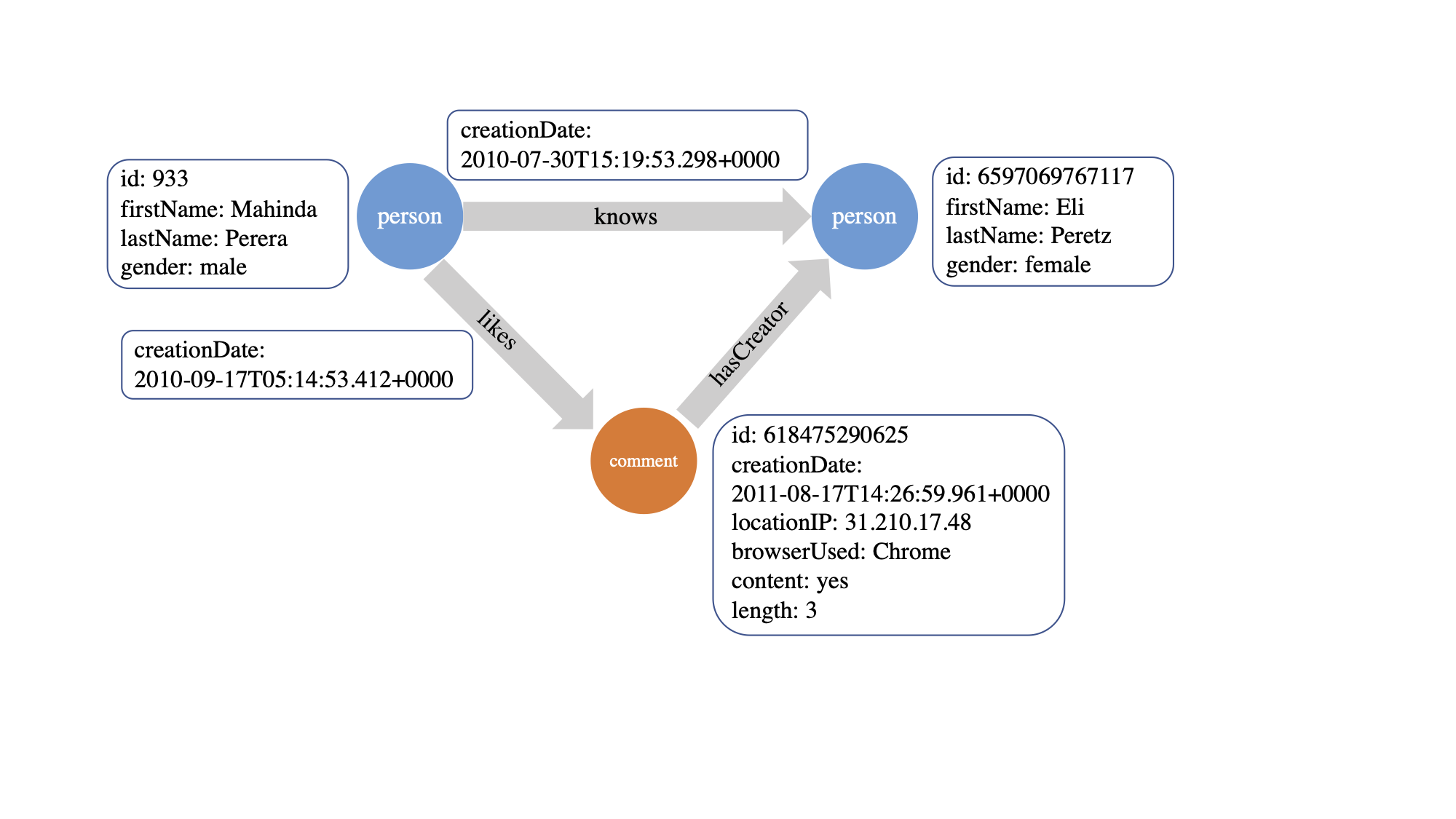
The following is an example property graph containing two types of vertices “person” and “comment” and three types of edges.
Vertices in GraphAr#
Logical table of vertices#
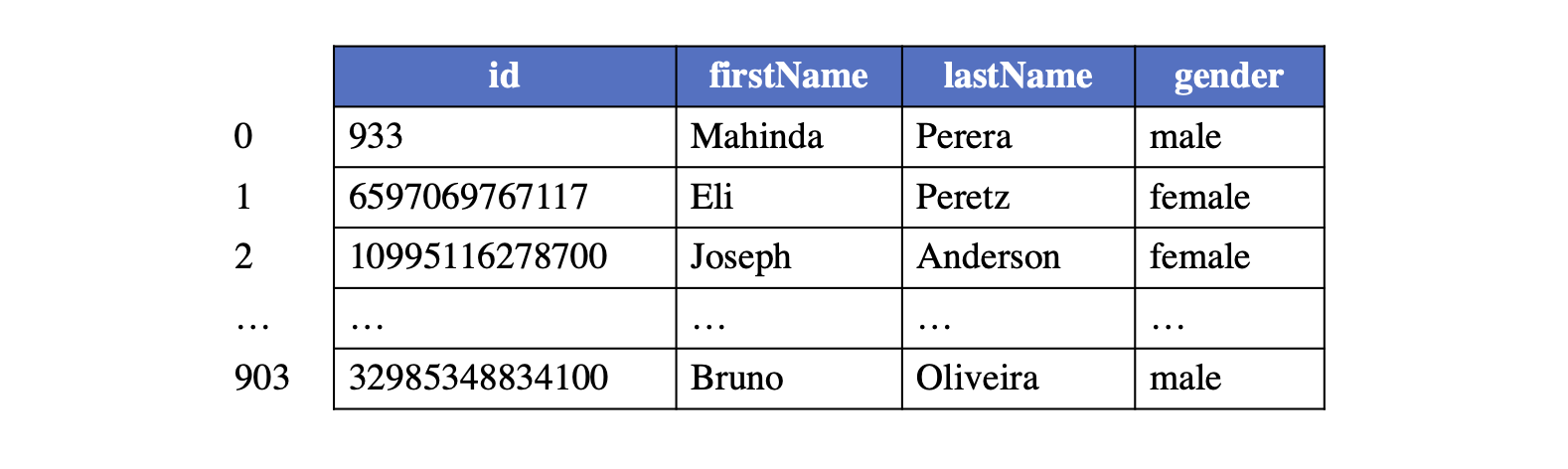
Each type of vertices (with the same label) constructs a logical vertex table, with each vertex assigned with a global index (vertex id) starting from 0, that is, the row number of that vertex in the logical vertex table. The following example shows the layout of the logical table for vertices that with label “person”.
Given a vertex id as well as the vertex label, a vertex can be identified uniquely, and the properties of it can be accessed from this table. When maintaining the topology of a graph, the vertex id is used to identify the source and destination for each of the edges.
Note
In the logical vertex table, some property can be marked as the primary key, such as the “id” column of the “person” table.
Physical table of vertices#
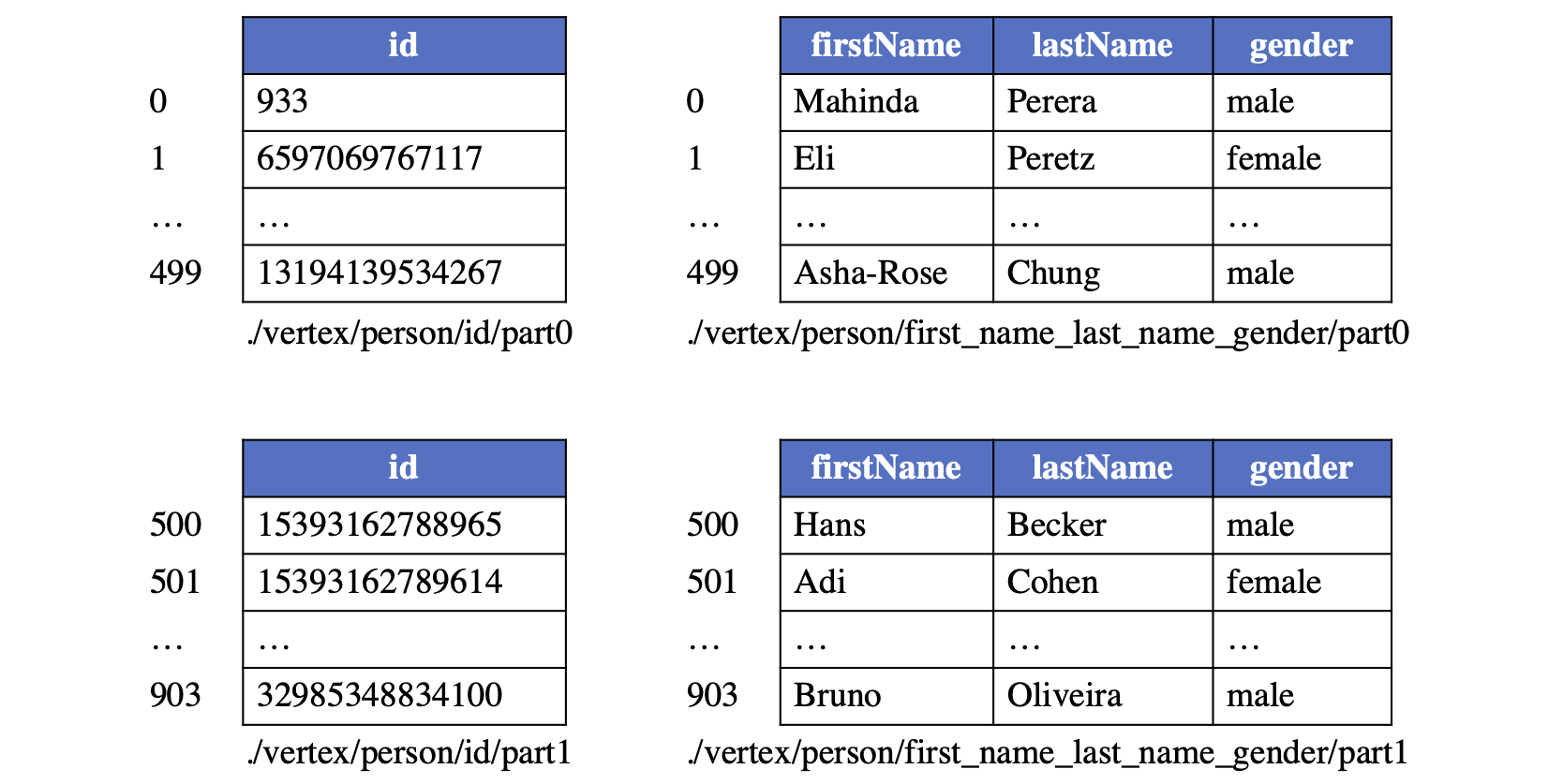
For enhancing the reading/writing efficiency, the logical vertex table will be partitioned into multiple continuous vertex chunks. And to maintain the ability of random access, the size of vertex chunks for the same label is fixed. To support to access required properties avoiding reading all properties from the files, and to add properties for vertices without modifying the existing files, the columns of the logical table will be divided into several column groups.
Take the “person” vertex table as an example, if the chunk size is set to be 500, the logical table will be separated into sub-logical-tables of 500 rows except the last one, which can be less than 500 rows. And the columns for maintaining properties are also separated, being divided into several groups (e.g., 2 groups for our example). Therefore, there are 4 physical vertex tables in total for actually storing the example logical table, as the following figure shows.
Edges in GraphAr#
Logical table of edges#
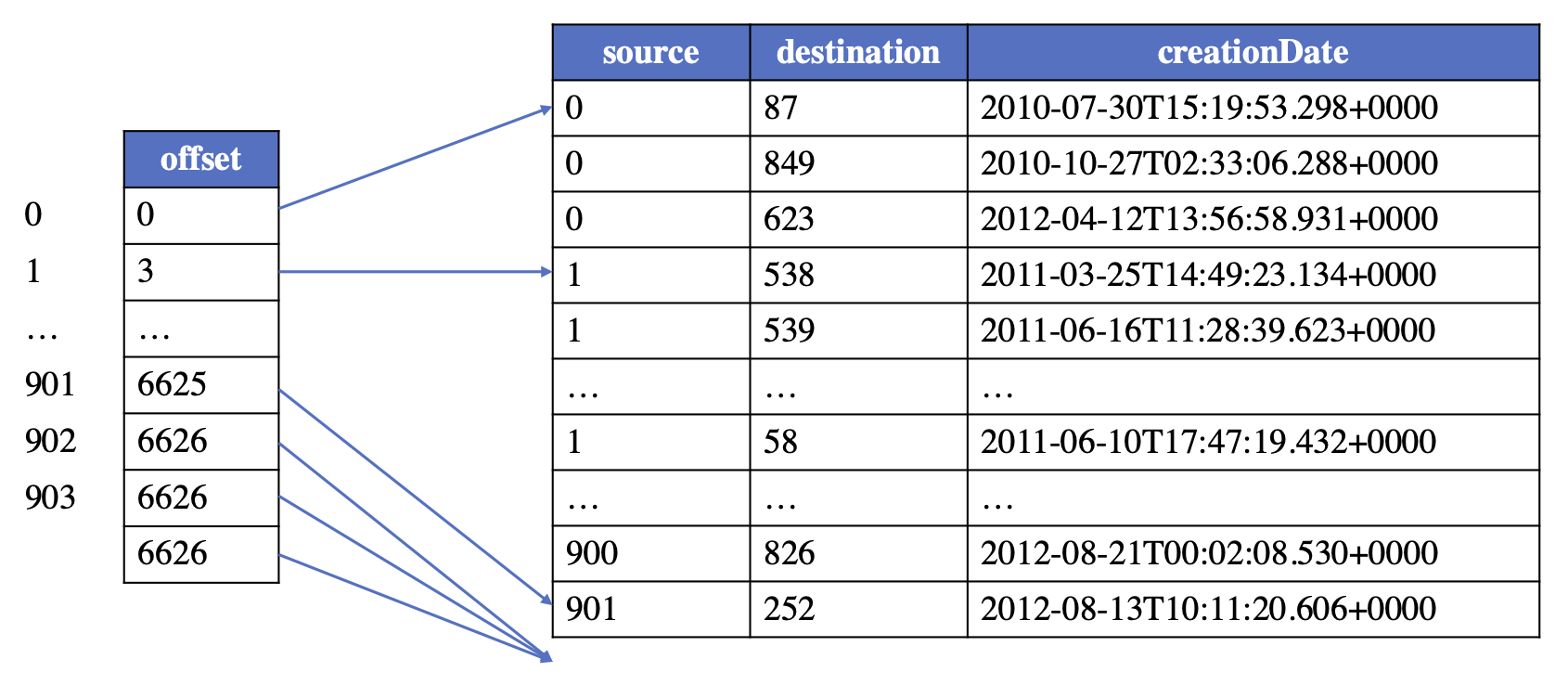
For maintaining a type of edges (that with the same triplet of the source label, edge label, and destination label), a logical edge table is established. And in order to support quickly creating a graph from the graph storage file, the logical edge table could maintain the topology information in a way similar to CSR/CSC (learn more about CSR/CSC), that is, the edges are ordered by the vertex id of source/destination. In this way, one offset table is required to store the start offset for each vertex’s edges. And the edges with the same source/destination will be stored continuously in the logical table.
Take the logical table for “person likes person” edges as an example, the logical edge table looks like:
Physical table of edges#
According to the partition strategy and the order of the edges, edges can be one of the four types: ordered_by_source, ordered_by_dest, unordered_by_source or unordered_by_dest. A logical edge table could contain physical tables of three categories:
The adjList table (which contains only two columns: the vertex id of the source and the destination).
The edge property tables (if there are properties on edges).
The offset table (optional, only required for ordered edges).
Since the vertex table are partitioned into multiple chunks, the logical edge table is also partitioned into some sub-logical-tables, with each sub-logical-table contains edges that the source (if the type is ordered_by_source or unordered_by_source) or destination (if the type is ordered_by_dest or unordered_by_dest) vertices are in the same vertex chunk. After that, a sub-logical-table is further divided into edge chunks in which the number of rows is fixed (called edge chunk size). Finally, an edge chunk is separated into an adjList table and 0 or more property tables.
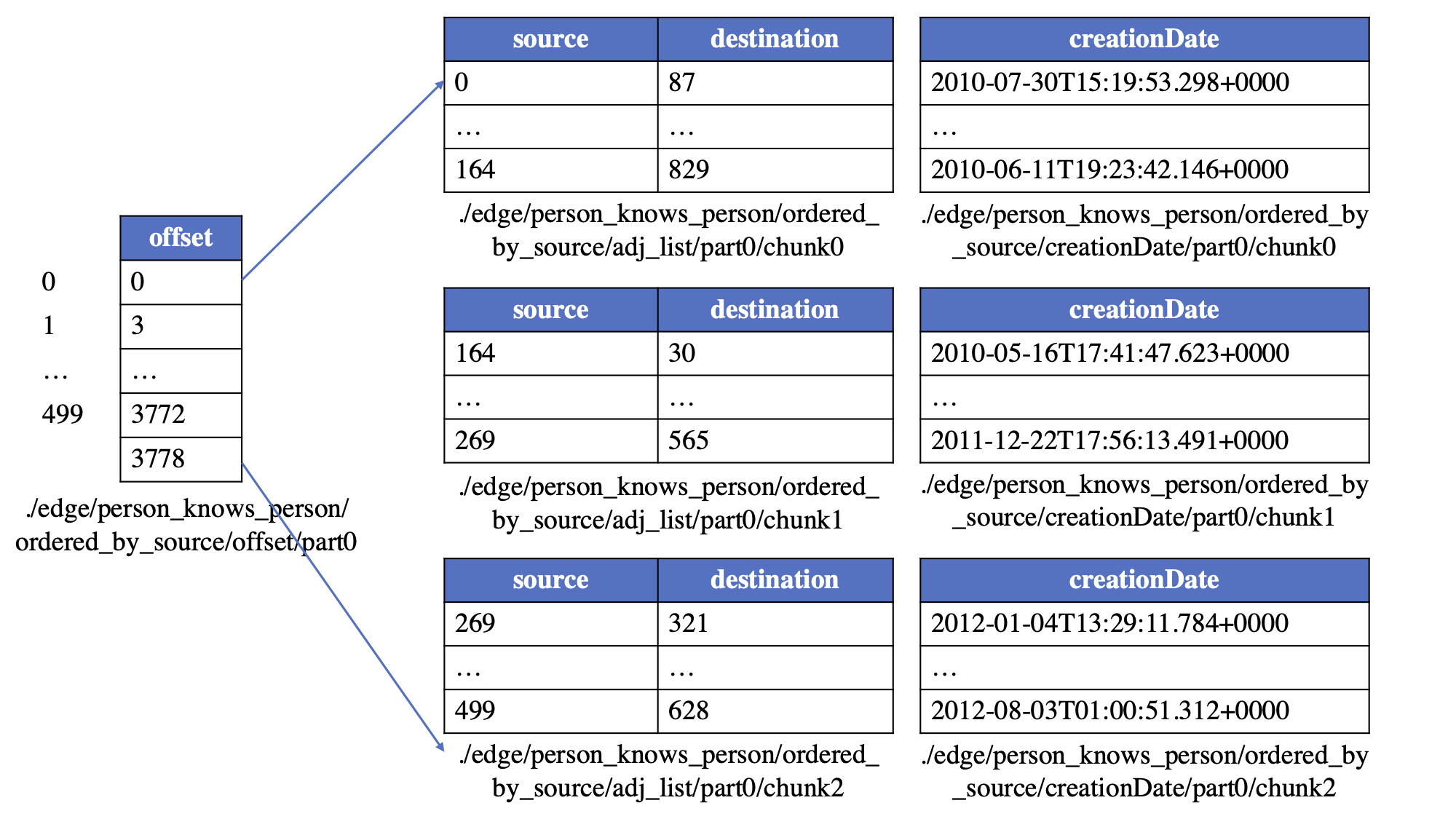
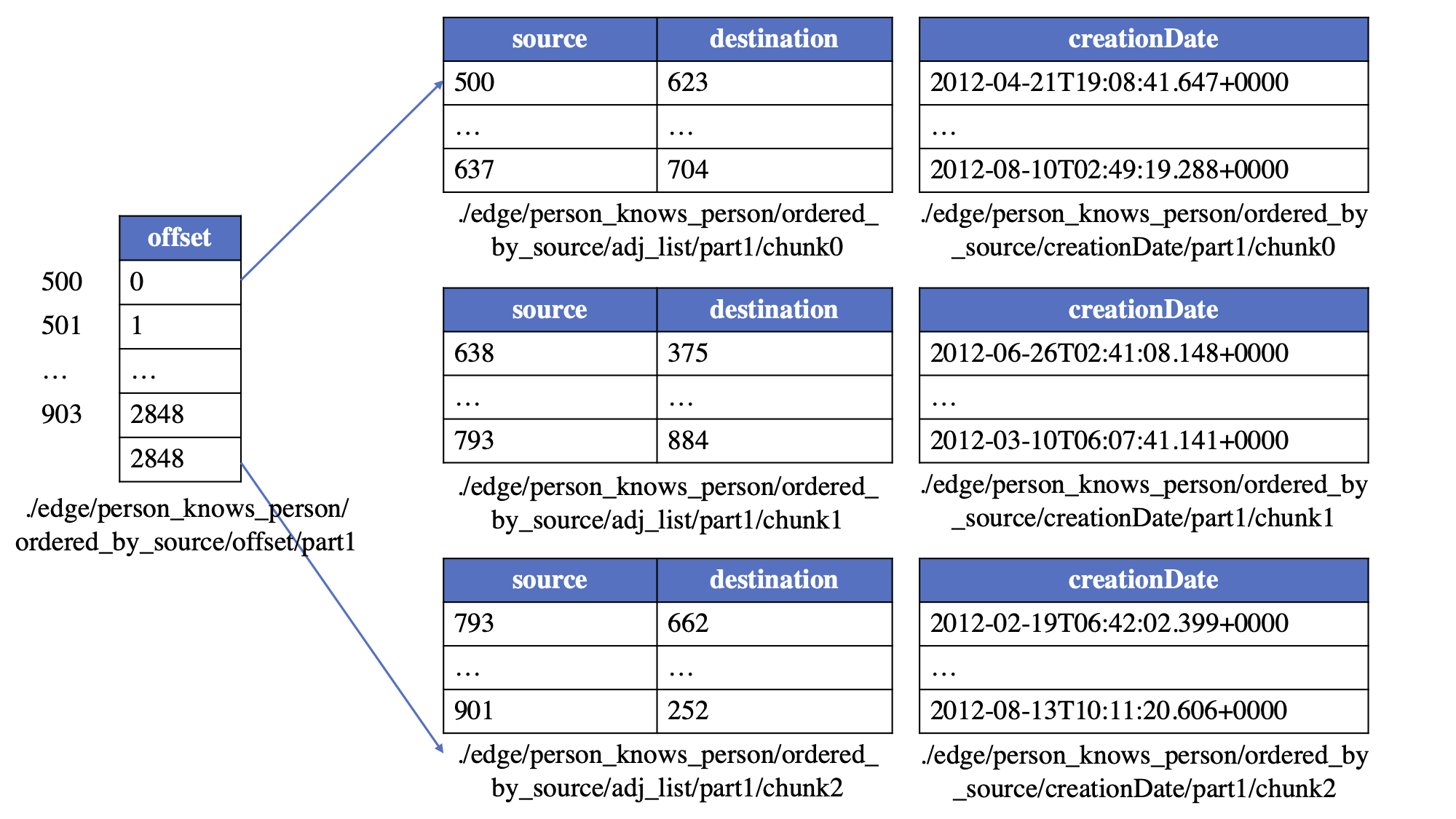
Also, the partition of the offset table is aligned with the partition of the corresponding vertex table. The first row of each offset chunk is always 0, means that to start with the first row of the corresponding sub-logical-table for edges.
Take the “person knows person” edges to illustrate, when the vertex chunk size is set to be 500 and the edge chunk size is 1024, the edges will be saved in the following physical tables:
Tip
When the edge type is ordered_by_source, the sorted adjList table together with the offset table can be used as CSR. Similarly, a CSC view can be constructed by sorting the edges by destination and recording corresponding offsets.
File Format#
Information files#
GraphAr uses two kinds of files to save a graph: a group of Yaml files to describe the meta information; and the data files to store actual data for vertices and edges. A graph information file which named “<name>.graph.yml” describes the meta information for a graph whose name is <name>. The content of this file includes:
the graph name;
the root directory path of the data files;
the vertex information and edge information files included;
the version of GraphAr.
A vertex information file which named “<label>.vertex.yml” defines a single group of vertices with the same vertex label <label>, and all vertices in this group have the same schema. The file defines:
the vertex label;
the vertex chunk size;
the relative path for vertex data files;
the property groups attached: each property group has its own file type and the prefix for the path of its data files, it also lists all properties in this group, with every property contains its own name, data type and if it is the primary key;
the version of GraphAr.
An edge information file which named “<source label>_<edge label>_<destination label>.edge.yml” defines a single group of edges with specific label for source vertex, destination vertex and the edge. It describes the meta information for these edges, includes:
the source/edge/destination labels;
the edge chunk size, the source vertex chunk size and the destination vertex chunk size;
if the edges are directed or not;
the relative path for edge data files;
which kinds of adjList it includes: for each kind of adjList, the adjList type, the prefix of file path, the file type and all its associated property groups are specified;
the version of GraphAr.
Note
Please note that GraphAr supports to store multiple types of adjLists for a group of edges at the same time, e.g., a group of edges could be accessed in both CSR and CSC way, if there are two copies (one is ordered_by_source and the other is ordered_by_dest) of data exist in GraphAr.
See also Gar Information Files for an example.
Data files#
As described earlier, each logical vertex/edge table is divided into multiple physical tables, and the physical tables will be stored in a file of one of the following formats:
Both of Apache ORC and Apache Parquet are column-oriented data storage formats. In practice of graph processing, it is common to only query a subset of columns of the properties. Thus, the column-oriented formats are more efficient, which eliminate the need to read columns that are not relevant. They are also used by a large number of data processing frameworks like Apache Spark, Apache Hive, Apache Flink, and Apache Hadoop.
See also Gar Data Files for an example.
Data Types#
GraphAr provides a set of built-in data types that are common in real use cases and supported by most file types (ORC, Parquet, CSV), includes:
bool
int32
int64
float
double
string
Tip
We are continuously adding more built-in data types in GraphAr. Meanwhile, GraphAr is going to support self-defined data types.